

How to Automate Security Questionnaires With LLMs (And Where DIY Automation Breaks Down)
Automating security questionnaires with an LLM is straightforward to start and hard to maintain. Here's how to build one, where it breaks, and when to move beyond DIY.
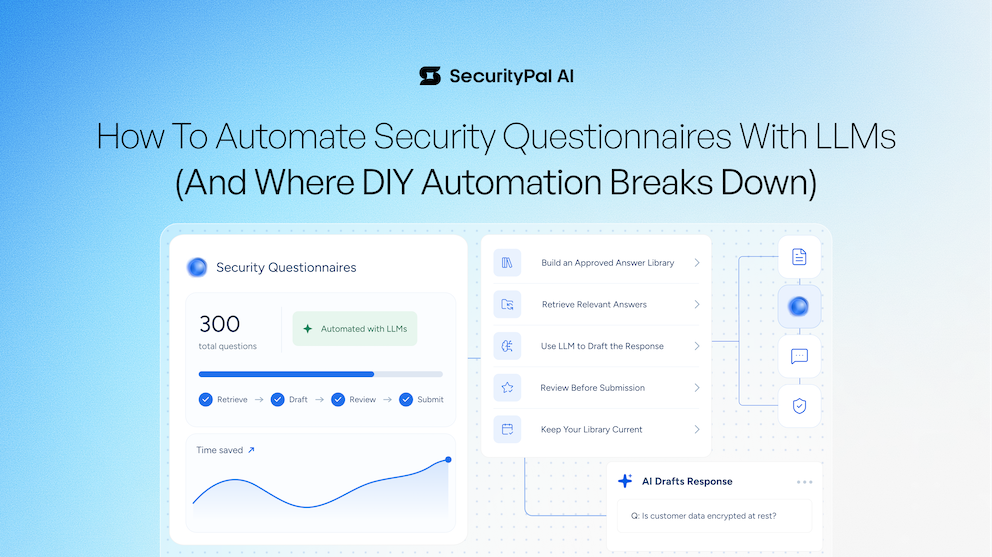
Every security team eventually hits the same wall: the security questionnaires never stop coming, and answering them well often means saying the same fifty things in slightly different ways over and over again.
So it’s no surprise that security teams are looking to large language models (LLMs) to automate the process. And these days, the tooling to actually do it exists.
But “you can automate this” and “you’ve solved this” are two very different statements.
No single LLM made security questionnaires disappear the way the hype cycle promised a few years ago. What did happen is quieter and more useful: the underlying technology got good enough that you can build a genuinely helpful questionnaire-answering workflow yourself.
For teams handling a relatively small number of questionnaires, that may be all you need. Here’s how to build one — and what you need to watch as your questionnaire volume grows.
How to Automate Security Questionnaires With an LLM
At a basic level, the approach is straightforward: give an LLM access to security answers your organization has already approved, retrieve the most relevant information when a new question comes in, and use that context to draft a response.
The key is not treating the LLM as the source of truth. Your approved security knowledge is the source of truth. The model is there to retrieve, synthesize, and draft from it.
A basic workflow looks like this.
Step 1: Build a Library of Approved Security Answers
Start by gathering previously completed questionnaires, policies, compliance documentation, security controls, and other information you routinely use to answer customer questions. But don't simply drop every old questionnaire into a folder and call it a knowledge base.
Identify answers that are:
- Current and factually accurate
- Approved by the appropriate security or GRC stakeholder
- Representative of how your organization wants to answer that question today
- Supported by current policies, controls, and documentation
If the same question has been answered differently across multiple questionnaires, resolve the inconsistency before adding it to your approved library. This is important because an LLM can't reliably determine which of five contradictory answers represents your current security posture. Better source material produces better automation.
Step 2: Retrieve Relevant Answers for Each New Question
Once you have a library of approved answers, you need a way to retrieve the most relevant context when a new security question arrives. Rather than feeding your entire questionnaire history into the model every time, use a retrieval step to identify the closest approved answers or supporting documentation.
For example, if a customer asks: "Is customer data encrypted at rest?" your workflow should retrieve the approved information related to encryption at rest, including any relevant standards, scope, exceptions, or supporting policies. This gives the LLM focused context and reduces the likelihood that irrelevant or contradictory information influences the response.
Step 3: Use the LLM to Draft the Response
Next, prompt the LLM to draft an answer based specifically on the information it retrieved. Your instructions should make the boundaries clear: answer using approved context, don't invent missing information, and flag questions that can't be answered confidently from the available knowledge. You can also provide guidance around tone, terminology, response length, and formatting so drafts resemble the answers your team would write manually.
The goal isn't to let the model independently determine your security posture. It's to eliminate the blank-page work of repeatedly translating known information into slightly different customer questions.
For a 300-row questionnaire, that distinction matters. Instead of writing hundreds of answers from scratch, your team can start with pre-drafted responses grounded in information it has already approved.
Step 4: Review Every Answer Before Submission
This is the step you shouldn't automate. LLMs can confidently generate inaccurate security questionnaire responses, even when the output sounds completely plausible. A model might overgeneralize an existing control, misunderstand the scope of a policy, or confidently say “yes” to something your organization doesn't actually do.
In another context, a hallucination might be an inconvenience. In a security questionnaire, it's a statement about your company's security posture that you're sending directly to a customer's security team.
Have someone with the appropriate security knowledge review responses before they leave your organization. Pay particular attention to answers involving controls, certifications, data handling, encryption, access management, incident response, regulatory requirements, and other claims where subtle differences in wording matter.
Step 5: Keep Your Knowledge Library Current
This is where the simple DIY workflow becomes considerably harder. Security programs change. Controls change. Certifications expire or get added. Policies are revised. Products gain new capabilities. Infrastructure changes. Your approved knowledge needs to change with them.
At minimum, establish a process for:
- Assigning owners to security answers
- Tracking when answers were last reviewed
- Updating answers when the underlying policy or control changes
- Removing outdated or duplicate responses
- Resolving contradictions between answers
- Periodically revalidating high-use security information
Without that maintenance, your LLM may continue producing polished answers based on information that stopped being true six months ago. And that's where DIY questionnaire automation starts to break down.
The Problem With DIY LLM Automation: Context Rot
The folder-and-agent approach usually doesn't fail on day one. It works surprisingly well at first. Then the context starts to rot. There are three places where this tends to happen.
Your Knowledge Library Becomes an Archive
A folder of old questionnaires isn't necessarily a knowledge base. It's an archive.
The same question may have been answered slightly differently across a dozen files. Some answers may still be accurate. Others were true two years ago and aren't anymore. Without active curation, there's no single source of truth. Your agent retrieves from a growing pile of overlapping — and eventually contradictory — information and has to determine which answer to use.
The library needs curation, not just storage. And curation is ongoing work that someone has to own.
Hallucinations Create Real Security Risk
Even with retrieval, LLMs can generate information that isn't supported by the source material.
The model might assert that you have a control you don't have, misrepresent the scope of a certification, or describe an encryption standard you never implemented — all in perfectly fluent language. A wrong “yes” isn't a typo. It's something your organization has represented as true to a customer's security team.
That's why human review remains so important, particularly as questionnaire automation expands.
Inconsistent Answers Erode Trust
Assessors notice when the same question gets three different answers across three questionnaires. Those inconsistencies can create additional questions, slow down the review process, and undermine confidence in the information you're providing.
At low volume, someone familiar with the security program can catch those differences manually. At higher volume, maintaining consistency across everything you've sent becomes something you have to actively engineer rather than simply hope for.
None of these are prompt-engineering problems. You can't write a more clever system prompt to fix a stale, contradictory knowledge library. That's the trap: the drafting was never the hardest part. The knowledge behind the drafting is.
When Should You Build Your Own Security Questionnaire Automation?
For teams answering a relatively small number of security questionnaires, a DIY LLM workflow can be a great fit. If your knowledge library is small enough to understand and maintain, the questionnaire volume is manageable, and someone knowledgeable can review every answer, build it. You can eliminate a meaningful amount of repetitive work without investing in a dedicated platform.
The math starts to change as volume increases. When you're fielding dozens or hundreds of questionnaires, maintaining the knowledge library becomes a job of its own. Review load scales past what one person with a prompt can reasonably absorb. Keeping every answer accurate and consistent requires an ongoing process. At that point, you're no longer solving a prompting problem. You're running maintained security knowledge infrastructure.
The Most Important Part of LLM Questionnaire Automation Isn't the LLM
Any capable LLM can draft a decent answer when you give it good context. The hard, never-finished work is maintaining the knowledge behind it. A trustworthy security knowledge library should have a single approved source of truth for the questions you're repeatedly asked — not dozens of near-duplicates scattered across old files. Answers should have owners and review processes so you know what's still true and what has gone stale.
And when the system can't confidently answer a question from approved information, it should escalate to a human rather than fill in the gaps itself. That's ultimately what determines whether questionnaire automation stays trustworthy or slowly drifts into confidently wrong.
It's also the problem SecurityPal is designed to solve.
SecurityPal combines AI-powered questionnaire automation with a maintained Knowledge Library and certified human review. Instead of leaving your team to continually curate old questionnaires, validate generated answers, and keep security knowledge current on its own, SecurityPal manages the infrastructure behind the automation.
If you're still at the small-batch stage, a DIY workflow can be useful. But the risk is hitting its limits at exactly the wrong time: when questionnaire volume is surging, enterprise deals are accelerating, and your team has the least capacity to rebuild infrastructure and workflows. Outsourcing security assurance earlier gives you a foundation that can scale with demand instead of forcing you to catch up to it.
If you've already hit the wall, request a SecurityPal demo to see what questionnaire automation looks like when the knowledge and review layers are built in.


.webp)

